I have been talking to AI for two years. Thousands of conversations, spread across four different apps, and every good lesson vanished into them the moment I closed the window. This project turns that chaos into one memory I can actually search.
The idea is not new and not mine. Andrej Karpathy wrote about keeping your own knowledge as a searchable wiki, and Charlie Hills showed how to turn that into a second brain with AI. I translated it to my own situation: everything I have ever discussed with an AI, findable in one place, and distilled into knowledge I actually reuse.
The reason
Knowledge that evaporates
A good AI conversation can be worth its weight in gold. You solve a tricky problem, you get a sharp insight, you nail down an approach that works exactly. And then you close the tab, and it is gone. The next time you hit the same problem, you start over from scratch.
For me that happened four times at once. I use Claude, ChatGPT, Grok and Gemini side by side, each for something different. For two years the conversations piled up in four separate silos, none of them properly searchable, and not one aware of the others. My own thinking lay scattered across four apps I could not reach into.
What I wanted was simple to describe and hard to build: one place where it all comes together, where I can find back what I once figured out, and where recurring themes get summarised into knowledge I genuinely reuse.
I was not short on insights. I was short on a place where they stuck.
The approach
From loose chats to a wiki
The solution works in two layers. The first layer is the raw archive: every conversation as a separate, searchable note. The second layer is the wiki: per topic a summary that distils the essence of dozens of conversations. The first layer remembers everything, the second layer understands it.
- Collect and clean. I export the full history from each platform and automatically strip out personal data and accidentally pasted passwords before anything is stored.
- One note per conversation. Each conversation becomes a file with a short summary, keywords and links to related conversations. Trivial chats are skipped.
- Compile into knowledge. When a topic keeps coming back across conversations, it becomes a wiki page that summarises the lessons in my own words, with links back to the source.
Everything lives in Obsidian, a local store of plain text files. Thanks to the links between them, a map emerges on its own: you see not only which conversations belong together, but also which projects grew out of them.
Deliberately no heavy machinery. I do not have a powerful computer that can run a local AI model, and it turns out I do not need one. The whole system is plain text: searchable with simple tools, and it runs on an ordinary laptop. The intelligence is not in expensive hardware, but in the structure and the discipline around it.
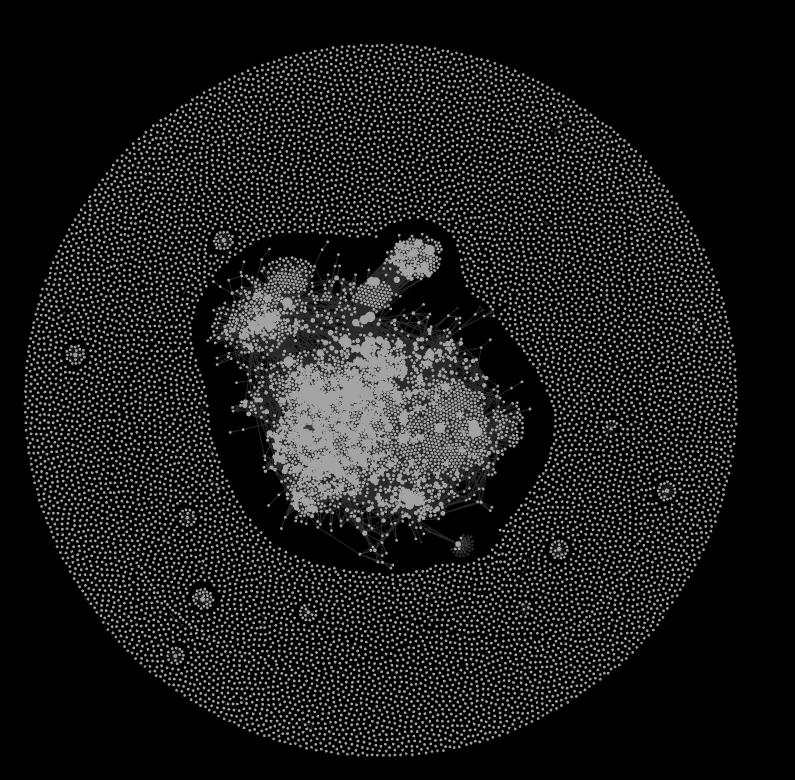
The knowledge base as a graph in Obsidian. The dense core is the compiled, interlinked knowledge. The outer ring is loose conversations still waiting for a connection.
What broke
Where it chafed
Drawing a pipeline is easy. Pushing two years of messy exports through it is not. Three things cost the most effort.
Scale. The Grok export alone was 730 MB. Processing it all at once stalled, so it happens in batches, with a log so a crash does not mean starting over.
Duplicates. Some platforms export your entire history every time, not just the new part. Reprocessing blindly would fill the archive with duplicates. The fix is a check on a unique marker per conversation: already known and unchanged gets skipped, a newer version overwrites the old, only genuinely new conversations are added.
Privacy. This is my own history, with everything that accidentally ends up in it. Email addresses, phone numbers and pasted keys are stripped out automatically, and the raw archive deliberately stays on my own laptop instead of in the cloud.
Memory lies. The database does not, as long as you fill it honestly.
The result
What it delivers
It is there, and it grows with every new export.
As of July 2026. The archive grows on its own with every new export.
More important than the numbers is what it makes possible. I can now ask something like "what did I figure out again about that one approach" and immediately find the spot where it was solved, with the source attached. And this archive has become the feeding ground for Kai, my AI assistant: it draws on the same knowledge base instead of starting over every time.
The honest flip side
Never quite finished
A second brain is not a project you complete, it is a garden you tend. The raw archive is complete, but the compiled wiki never is: there are always topics still waiting for a good summary. That is not a failure, that is the nature of the thing.
The most important lesson is in the discipline of looking things back up. A system that answers your question from its own memory, instead of from the source, sounds smart but makes things up. So there is a hard rule here: find the passage literally first, then answer. And "that is not in there" is a valid answer, not a shortcoming. A second brain is only worth anything if you can trust it.
Sources & inspiration
Where the idea comes from
This project stands on the shoulders of two people: Andrej Karpathy, with his idea of keeping your own knowledge as a searchable wiki, and Charlie Hills, who showed how to build a second brain with AI that grows with you.
→ Andrej Karpathy - LLM-powered personal knowledge base (GitHub)
→ Charlie Hills - How I built a 2nd brain with AI (Substack)
The image at the top of this page is AI-generated (halftone paper collage). More of my AI image work is in the gallery.
Related work
More from this system
This memory doesn't stand alone: it feeds and gets fed.