I didn't need another AI chatbot. I needed something that remembers what I'm working on, guards the loose ends and actually pushes the work forward. That became Kai.
Kai is an AI partner with a memory and its own house rules. After every conversation it still knows where we left off. The name, by the way, didn't come from me: once the system was up, the AI named itself Kai. It plans my ideas, tracks what's done, co-writes this portfolio and runs daily routines without me switching anything on.
The reason
Too many ideas, too little overview
Kai wasn't designed, it grew. It started in the summer of 2025 with loose AI experiments: a game for my son, a first song, a news report that wrote itself. Fun, but scattered. The problem was never a lack of ideas, there were too many. Spread across notes, chats and tools, with no place where it all came together. Every idea I didn't pick up right away simply disappeared.
On 11 July 2025 that changed. On the same day I wrote down two ideas that would shape everything after: one fixed AI partner to tie all those loose experiments together, and a portfolio to show what comes out of it.
I wanted a system that knows what's going on and suggests what should come first. And one that pushes back when I take the wrong turn.
I didn't want an AI that listens. I wanted one that helps steer.
The approach
How Kai works
Kai runs on three building blocks that together make the difference between a chatbot and a real assistant.
- A real memory. All my projects, tasks and decisions live in one place. Kai reads that state again every time, so it always works on the current reality instead of an outdated picture.
- Multiple AI models, each with a role. Claude Opus does most of the thinking and building. For a full check of the whole system I use the heavier Claude Fable, and Google's Gemini writes the daily reports in my automations.
- Fixed house rules. Before Kai claims anything, it first fetches the latest state. Every task is automatically routed to the right way of working: writing something goes differently than planning a project or analysing data.
Memory lies, the database doesn't.
The result: Kai looks up what it needs to know and corrects a wrong assumption instead of going along with it. With a plan, it puts the strongest counter-argument on the table itself, as in the conversation below.
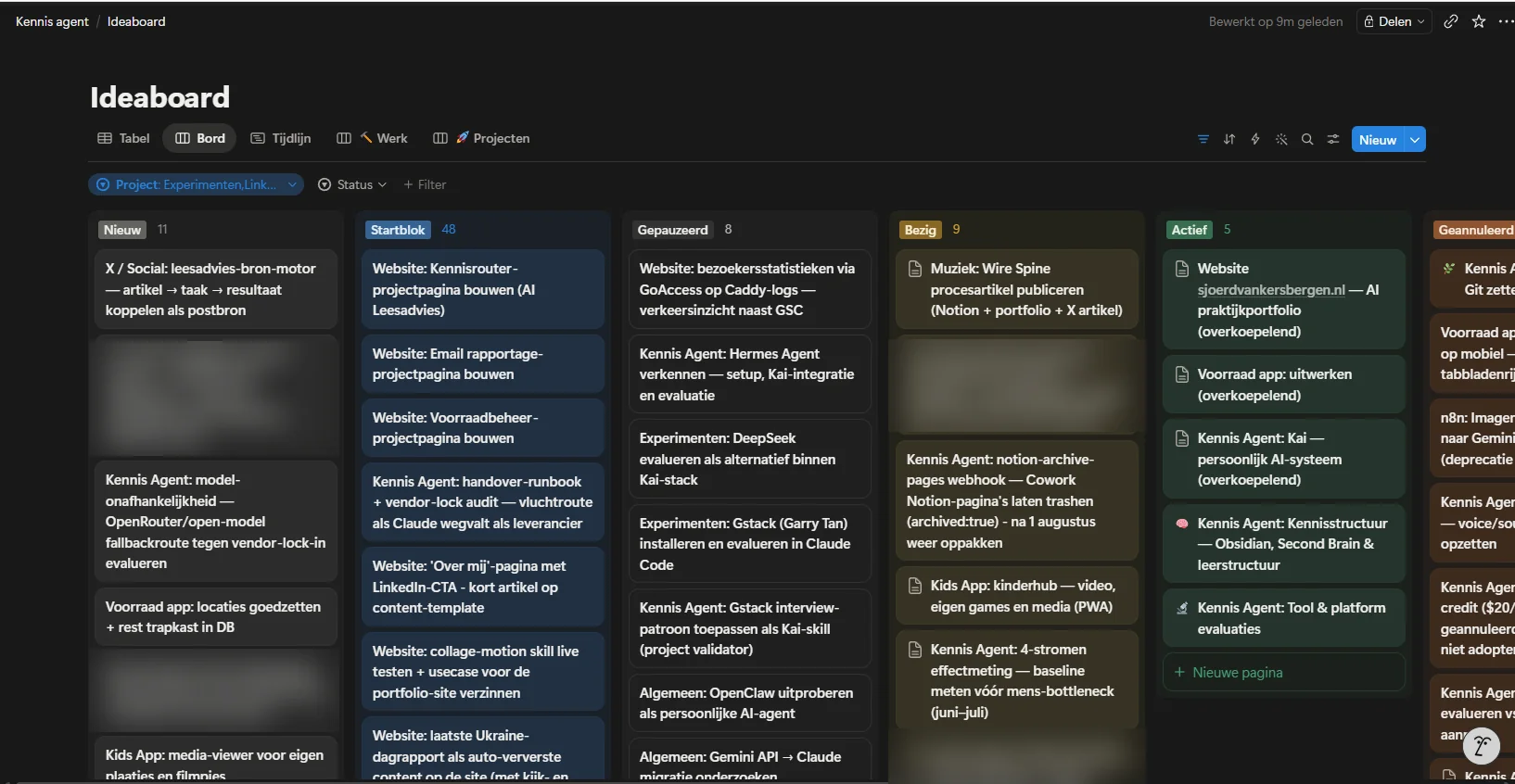
The ideaboard: every task with status, impact and plan of approach. Kai reads and writes here independently.
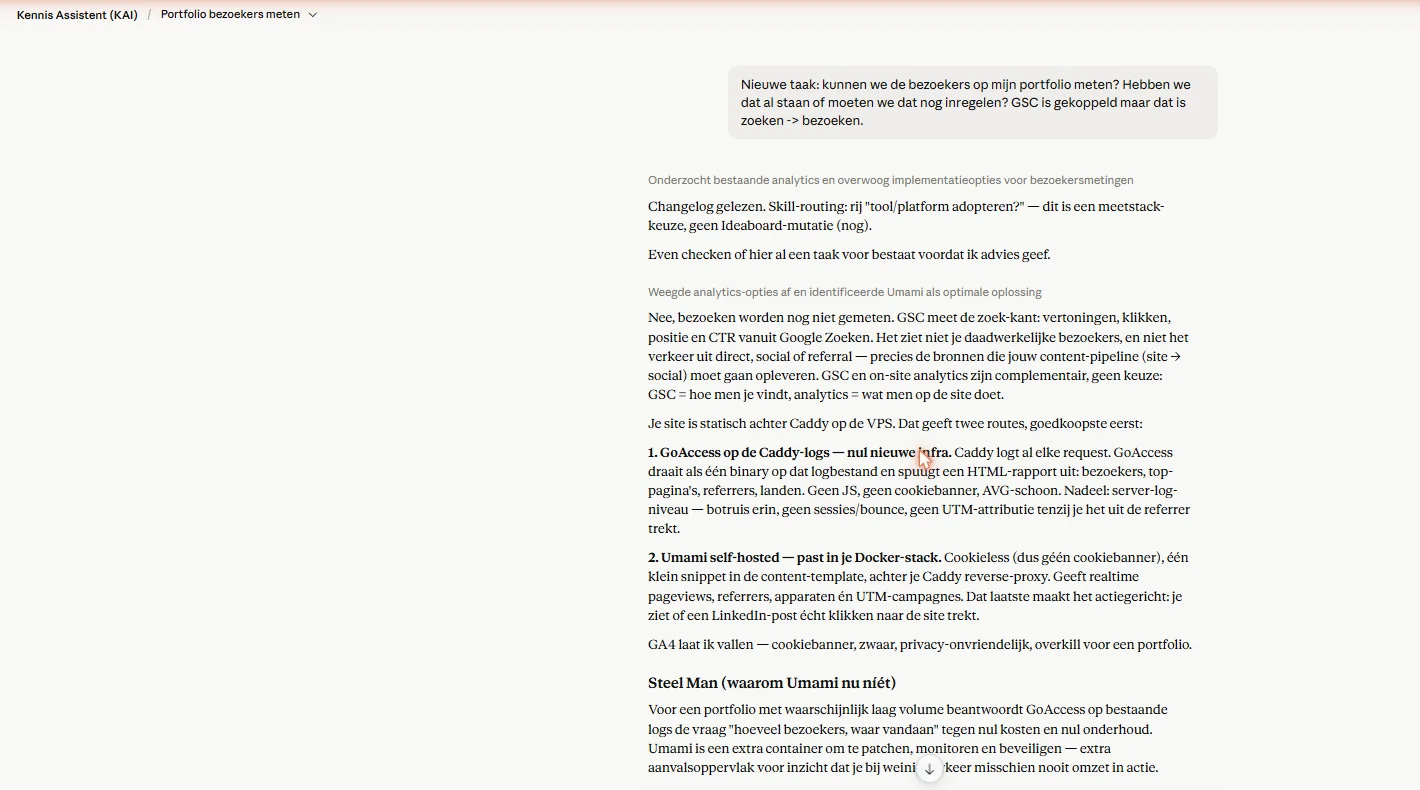
Kai in conversation: one loose question about site visitors. Kai checks the records first, gives an honest "no, we don't measure that yet", and puts the strongest counter-argument on the table itself.
The result
What it delivers
Kai runs every day. The numbers below update on their own.
I've been building this since July 2025, alongside a regular job, in evenings and weekends. I never tracked exactly how many hours it would have taken without AI. What I do know is that a large part of it would never have existed: I wouldn't have had the time.
The strongest demonstration is this site itself. The projects, the timeline and the changelog you see here are largely maintained and published by Kai.
The honest downside
The system became faster than me
Four parallel work streams sounds impressive. It feels that way too, until it doesn't. The bottleneck shifted from execution (the AI does that) to attention and switching between contexts (I still do that myself).
That's why Kai also guards my attention. When I put a project down halfway, Kai first writes down where I left off, so I can pick it up later without searching. And since late August 2026 the morning message points to one task for today, plus what I'm deliberately leaving for later.
Try it yourself
Want to build something like this?
You don't need to copy my setup to get started. Paste the prompt below into a strong AI model (Claude, ChatGPT or Gemini) and you'll get advice tailored to your situation - including what you definitely should not build.
I want to set up a personal AI system: one fixed AI partner with a real memory, that manages my tasks and ideas, thinks along about priorities and pushes back when needed. A digital chief of staff, not a chatbot.

Interview me first: ask up to ten questions about my work, the tools I currently use (task list, notes, calendar), how much time I want to invest and what I already do with AI.

Then research the current options and give me concrete advice:
1. Which building blocks I need: a memory/task source, an AI model and possibly automation.
2. A setup that fits my situation, technical experience and budget.
3. The first three steps I can take this weekend.
4. The pitfalls - and tell me honestly what I should NOT build in my situation.

Be critical and practical. No hype, no tool lists without a reason: every recommendation must follow from my answers.
Sources & inspiration
Where the idea comes from
Kai stands on the shoulders of two ideas: Andrej Karpathy's notion of keeping your own knowledge as a searchable wiki, and Charlie Hills' approach of an AI second brain that grows with you.
→ Andrej Karpathy - LLM-powered personal knowledge base (GitHub)
→ Charlie Hills - How I built a 2nd brain with AI (Substack)
→ AI Report - masterclass trilogy "Build your own knowledge system for AI" (Dutch): part 1 · part 2 · part 3
The image at the top of this page is AI-generated (Recraft). More of my AI image work is in the gallery.
Related work
More from this system
Kai doesn't stand alone: these systems feed it and show what it does.